
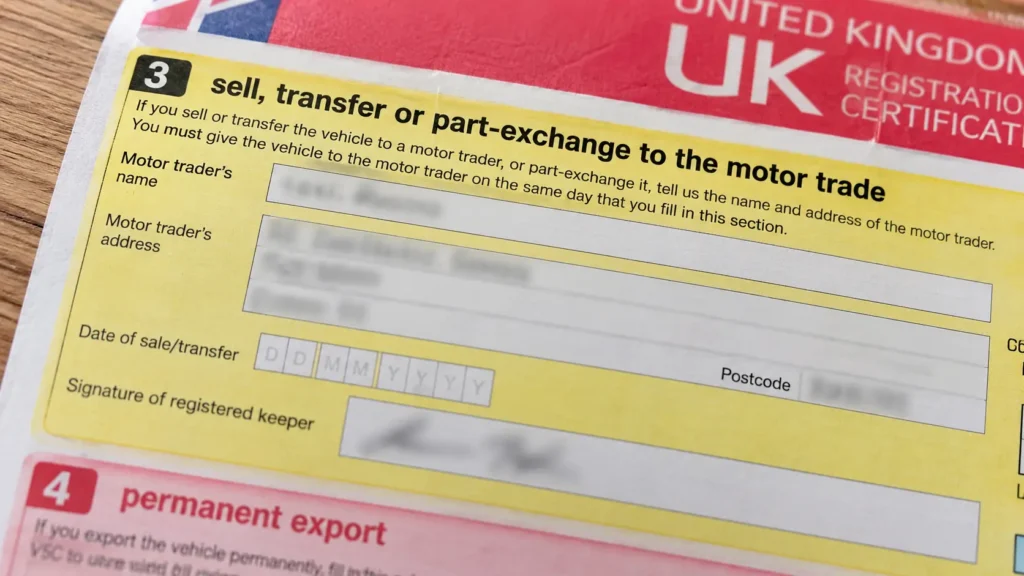
The V5C logbook is your vehicle’s registration certificate. It records who the DVLA holds responsible for the vehicle, known as the registered keeper, along with the car’s key details. The two parts that matter most are the green new keeper slip, which a private buyer takes away, and the yellow “sell, transfer or part-exchange your vehicle to the motor trade” section, which you keep when you sell to a dealer or scrap the car. On current red logbooks a private sale uses section 2 and the yellow slip is section 4. On older blue and green logbooks they’re sections 6 and 9.
Most people only open their logbook when they’re selling or scrapping, and then find the section numbers don’t match the advice they’ve just read online. That’s because the DVLA has changed the layout, and the numbers moved. We handle logbooks every day when collecting cars across Greater Manchester, so this guide explains what each part means, which part to use for what, and the mistakes that leave people still legally responsible for a car they got rid of months ago.
Quick facts
- What it is: the DVLA’s record of the registered keeper and the vehicle’s details.
- What it isn’t: proof of ownership. The keeper and the legal owner can be different people.
- Key number: the 11-digit document reference on the front. You need it to SORN, tax or tell the DVLA you’ve sold or scrapped the car.
- Selling privately: fill in the new keeper section and give the buyer the green slip.
- Selling to a dealer or scrapping: keep the yellow motor trade section and give the rest of the logbook to the buyer.
- Replacement: £25 with form V62, or online if your details haven’t changed.
- Not telling the DVLA about a sale or scrap can mean a fine of up to £1,000.
What is a V5C?
A V5C, also written V5 or V5C/1, is the vehicle registration certificate the DVLA issues for every registered vehicle in the UK. People call it the logbook, though it hasn’t been a book for decades. It’s a folded A4 document.
It does three jobs:
- It names the registered keeper, meaning the person responsible for taxing the vehicle, any fines and penalties, and telling the DVLA about changes.
- It records the vehicle’s details, including the make, model, colour, engine size, fuel type, VIN (chassis number), CO2 figure and the date of first registration.
- It contains the tear-off slips you use to tell the DVLA when the car is sold, scrapped or exported.
The registered keeper isn’t always the owner
The V5C itself states that it isn’t proof of legal ownership. In most families the keeper and owner are the same person, but not always:
- a car on hire purchase or PCP usually belongs to the finance company until it’s paid off
- a parent can be the keeper of a car their son or daughter owns, or the other way round
- a company or lease car is kept by one person but owned by a business
This matters when you sell or scrap. Before you buy a car, check for outstanding finance. Before you scrap one, make sure it’s actually yours to get rid of. Our guide to scrapping a car with outstanding finance explains what to do if there’s still money owing.
What does a V5C logbook look like?
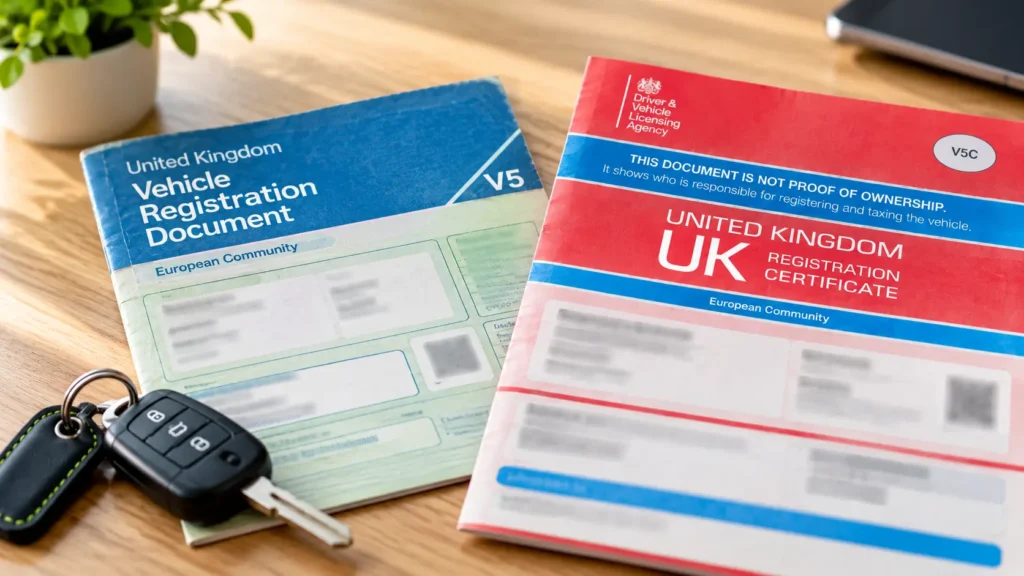
There are two designs still in circulation.
- The current logbook is mainly red and pink. It was redesigned in 2019 with coloured, numbered blocks on the front cover that show what each section is for, and its sections are numbered differently from the old design.
- The older logbook is blue and green and has more sections. Many are still valid, because the DVLA only issues a new logbook when something changes, such as the keeper or the address.
Whichever you have, it should carry a “DVL” watermark when held up to the light, and the VIN printed on it should match the one stamped on the car. That’s usually visible at the bottom of the windscreen and on a plate in the door frame or engine bay. If anything doesn’t match when you’re buying a car, walk away.
V5C logbook sections explained: which one to use
This is the bit that trips people up. The table shows the sections you’ll actually use, on both designs. If you’re ever unsure, go by the colour and the heading, not the number.
| What you’re doing | Current red V5C | Older blue/green V5C | What happens to it |
|---|---|---|---|
| Selling or giving the car to a private person | Section 2 | Section 6 | Fill in the buyer’s details. You both sign. You then tell the DVLA |
| The green new keeper slip (V5C/2) | Section 6 | The green slip (V5C/2) | Tear it off and give it to the private buyer. It lets them tax the car straight away |
| Selling to a dealer, or scrapping at a licensed facility (the yellow slip) | Section 4 | Section 9 | Fill it in and keep it. Give the rest of the logbook to the trader or scrap buyer |
| Changing your name, address or vehicle details | The section headed for changes to your details (the number differs between versions) | Change your address free online, or fill it in and post the logbook to the DVLA | |
| Exporting the car permanently | The permanent export section (the number differs between versions) | Fill it in and send it to the DVLA when the car leaves the UK | |
You’ll find guides online that still quote the old section numbers, or mix the two layouts together. So if your logbook doesn’t seem to match what you’ve read, go by the colour and the heading rather than the number. The yellow slip is headed along the lines of “sell, transfer or part-exchange your vehicle to the motor trade” or “transfer to a motor trader, insurer or dismantler”, depending on your version. The green slip is always the new keeper supplement, marked V5C/2.
Which part of the V5C do you use when you sell?
Selling to a private buyer
- Fill in the new keeper section (section 2 on the current logbook) with the buyer’s name and address and the date of sale. You both sign the declaration.
- Tear off the green new keeper slip, fill in the date, and give it to the buyer.
- Tell the DVLA. The quickest way is online at gov.uk/sold-bought-vehicle using the 11-digit reference. You’ll get an email confirmation straight away. Alternatively, post the logbook to the DVLA.
- Keep your confirmation. It’s your proof that you stopped being the keeper from that date.
For the full private sale process, including payment and paperwork, see our guide to selling your car privately.
Selling to a dealer or trade buyer
Have the trader fill in the yellow motor trade section, then give them the rest of the logbook. You can tell the DVLA online and then destroy the yellow slip, or post the yellow perforated section to the DVLA. Either way, don’t just hand over the whole document and assume someone else will deal with it.
Which part of the V5C do you use when you scrap your car?
Scrapping follows the motor trade route, because a licensed scrap facility, known as an Authorised Treatment Facility or ATF, counts as the motor trade. The official gov.uk process is:
- Give the logbook to the ATF or its collection driver, but keep the yellow “sell, transfer or part-exchange” section.
- Tell the DVLA the car has gone to an ATF. You can do it online with the 11-digit reference, or by posting the yellow section.
- Keep your records. That means the yellow slip (or your online confirmation), the receipt, and the Certificate of Destruction when it arrives.
Any full months of vehicle tax left are refunded automatically once the DVLA has been told. The refund goes to the address on the logbook, so if you’ve moved, update it before you scrap the car. We cover the notification step in detail, including timings and what the DVLA sends you, in how to tell the DVLA you’ve scrapped your car.
When we collect a car, we go through the logbook with you at handover and deal with the DVLA side for you. Knowing which slip stays with you still matters, because that’s your proof.
Got a private number plate?
Take it off before you sell or scrap the car. Once the DVLA has been told the car has gone, it’s too late, and the plate goes with it. Our guide to keeping your number plate explains how.
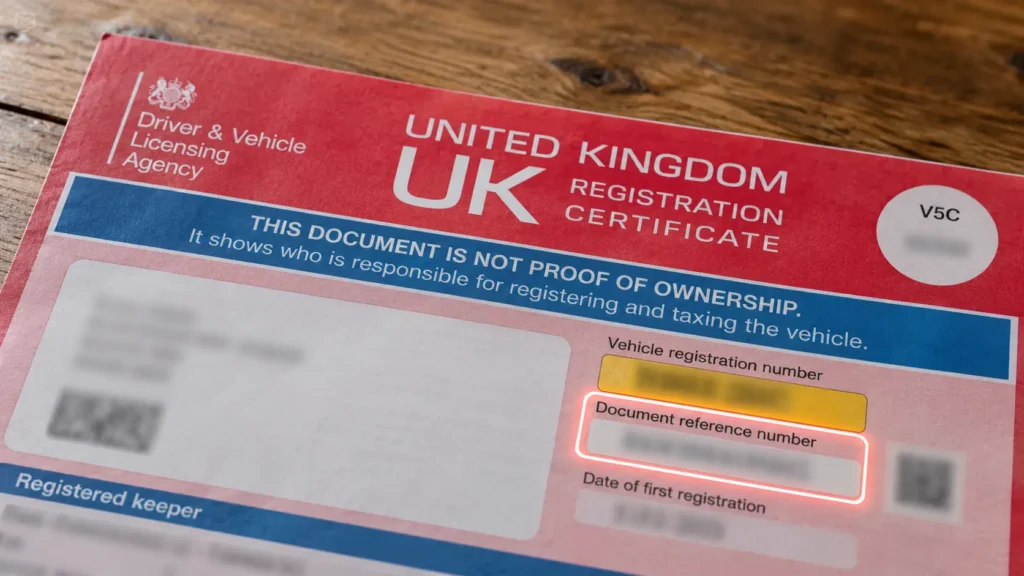
What is the V5C reference number, and where do you find it?
The 11-digit document reference number is printed on the front page of the logbook. It’s effectively the key to your car’s record. You need it to:
- declare SORN online
- tax the car if you don’t have a tax reminder letter
- tell the DVLA online that you’ve sold, transferred or scrapped the car
- take a private number plate off the car
The green new keeper slip has its own 12-digit reference, which a new keeper uses to tax the car before their own logbook arrives.
Never post a photo of your V5C online with the reference visible, and don’t send a full picture of it to a buyer you haven’t met. With the registration and that number, someone can make changes to the vehicle’s record. If a buyer wants to check the logbook, show it to them in person.
Lost, stolen or never received your V5C?
- Lost or damaged: apply for a replacement for £25. Online or by phone it usually arrives within 5 to 7 working days. By post with form V62 it can take around 4 weeks. You don’t need the old logbook to scrap the car. See our lost V5C guide, and for scrapping without one, our scrap without a logbook page.
- Bought a car and the new logbook hasn’t arrived: if it hasn’t turned up within 4 weeks, contact the DVLA. Use the green slip to tax the car in the meantime. Leave it longer than 6 weeks and you’ll usually have to pay £25 for a replacement instead of getting one free.
- Stolen logbook: apply for a replacement in the same way. If you think someone may try to use it to sell your car, report it to the police as well.
Common V5C mistakes that cost people money
- Handing over the whole logbook to a dealer or scrap buyer and keeping nothing. If they never notify the DVLA, you have no proof you’d got rid of the car.
- Not telling the DVLA at all. You stay the keeper on record, so speeding tickets, parking fines and tax penalties for that car keep coming to you. You can also be fined up to £1,000.
- Using the wrong section because a website quoted the old numbering. Go by the colour and the heading.
- Selling to an unlicensed “scrap” buyer who pays cash and then sells the car on. Only a licensed ATF can scrap a car legally and issue a Certificate of Destruction. Our guide on what an ATF is explains how to check.
- Moving house and not updating the logbook. Tax refunds, new logbooks and DVLA letters go to the old address, and you can be fined up to £1,000. Changing it is free at gov.uk/change-address-v5c, and the new logbook usually arrives within 5 working days.
Frequently asked questions
What is a V5C logbook?
It’s the vehicle registration certificate issued by the DVLA. It shows who the registered keeper is and records the vehicle’s details. It contains the slips you use to tell the DVLA when you sell, scrap or export the car.
Is the V5C proof of ownership?
No. It shows the registered keeper, the person responsible for the vehicle, who isn’t always the legal owner. For proof of ownership, use the purchase receipt or the finance settlement letter.
Which section of the V5C do I fill in when I scrap my car?
The yellow “sell, transfer or part-exchange your vehicle to the motor trade” section. That’s usually section 4 on the current red logbook and section 9 on older ones. Keep that slip, give the rest of the logbook to the scrap facility, and tell the DVLA.
What is the green slip on a V5C?
The green slip is the new keeper supplement (V5C/2). In a private sale, the seller gives it to the buyer, who can use its 12-digit reference to tax the car before their own logbook arrives.
Where is the 11-digit reference number on a V5C?
It’s on the front page of the logbook, labelled as the document reference number. You need it to tax, SORN or tell the DVLA about a sale or scrap online.
Can I scrap a car without a V5C?
Yes. A licensed scrap facility can take a car without its logbook, as long as you can show it’s yours to dispose of. You then write to the DVLA with the details of the sale, or apply for a replacement logbook.
How much does a replacement V5C cost?
£25. Apply online or by phone and it usually arrives within 5 to 7 working days. Apply by post with form V62 and it can take around 4 weeks.
How long does a new V5C take to arrive?
After an online address change, usually within 5 working days. After buying a car, contact the DVLA if it hasn’t arrived within 4 weeks. Wait more than 6 weeks and you’ll usually have to pay £25 for a replacement.
Scrapping your car in Greater Manchester?
Bring the logbook if you have it, or don’t worry if you can’t find it. Get an instant scrap car quote and we’ll collect for free from anywhere in Manchester, Salford, Stockport, Oldham, Trafford and the rest of Greater Manchester. We go through the paperwork with you at collection, handle the DVLA side, and pay you by bank transfer on the day. Call us on 07432 675878 if you have a question about your logbook first.